QR Code Quiet Zone: How Much Margin Your Code Needs (2026)
The quiet zone is the empty margin around a QR code, and leaving it out is one of the most common reasons a code will not scan. Here is what the quiet zone is, how big it should be, and why it matters in 2026.

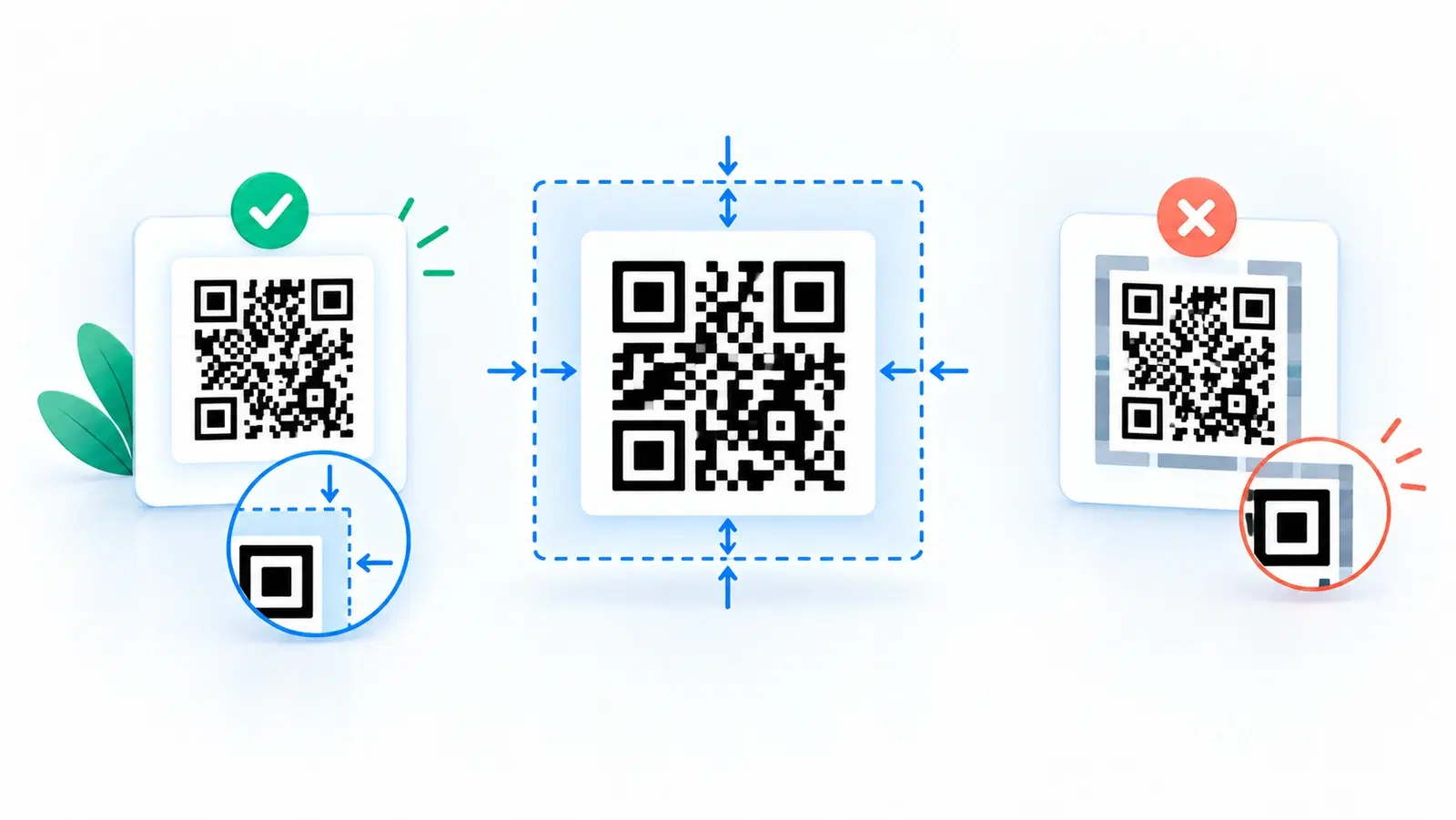
There is a small, invisible part of every QR code that is easy to overlook and surprisingly important: the quiet zone, the empty margin of clear space around the code. It holds no data and is easy to mistake for wasted space, so people crop it, crowd it, or design right up to the edge of the code. That is one of the most common reasons a code fails to scan.
The quiet zone exists so a scanner can tell where the code begins and ends. Without enough clear margin, the scanner cannot reliably isolate the code from whatever surrounds it, and scanning becomes unreliable or impossible. It is a small requirement with an outsized effect on whether your code works.
This guide explains what the quiet zone is, how big it should be, why it matters so much, and the mistakes that eat into it, so your codes scan reliably every time. It is a focused technical explainer that complements our broader size guide and best practices; here we zoom in on the margin specifically.
What the Quiet Zone Is and Why It Exists
The quiet zone is simple to define and important to understand.
Definition: the clear margin around the code. The quiet zone is the border of empty, unmarked space surrounding the QR code pattern. It contains no modules and no decoration, just clear background. It frames the code on all four sides.
Why it exists: so the scanner can find the code. A scanner needs to locate the boundaries of the QR code to read it, to know where the pattern starts and stops. The quiet zone provides the contrast break that lets the scanner isolate the code from everything around it. Without that clear margin, surrounding text, graphics, or edges blur into the code's boundary, and the scanner struggles to recognize where the code actually is. See how QR codes work.
It is part of the code, not optional padding. The most important mindset shift: the quiet zone is a functional part of the QR code, not decorative padding you can trim. The code is the pattern plus its surrounding clear margin. Treat the quiet zone as part of the code itself, and you will not be tempted to crop or crowd it.
What happens without it. A code with no (or too little) quiet zone may scan slowly, scan only in perfect conditions, or not scan at all, especially when crowded against text or a busy background. And because it often still scans on a good phone up close, the problem frequently goes unnoticed until the code fails in the real world. That silent-failure quality is exactly why the quiet zone deserves attention. See why QR codes fail to scan.
How Big Should the Quiet Zone Be?
There is a standard guideline, and a practical way to apply it.
The standard: about 4 modules wide. The widely-used guideline is a quiet zone of at least 4 modules on every side, where a "module" is one of the small squares that make up the code. So the clear margin should be about four of those small squares wide all the way around. This is the commonly referenced minimum for reliable scanning.
The practical version: a clear margin proportional to the code. Since counting modules is awkward in practice, the simple working rule is: leave a clear margin around the code roughly equal to several of its small squares, which visually is a noticeable border of empty space, not a hairline. If the code looks crowded, the quiet zone is too small. A comfortable, obvious margin of clear space is the goal.
When to give it more. Err toward a larger quiet zone when:
- The code sits near text, images, or busy elements (more separation helps the scanner).
- The code is on a colored or patterned background (a clear margin of solid background around it matters even more).
- Scanning conditions may be difficult (distance, poor light, older devices).
Most good generators include it by default. Reputable QR generators add an appropriate quiet zone automatically in their exports. The danger is usually downstream: someone crops it, resizes without the margin, or places the code too close to other elements in a design. So the job is often less about adding the quiet zone and more about not destroying it, which the next section covers.
Pro Tip
A quick visual check: if anything, text, a border, an image edge, or a busy background, comes right up close to your QR code with no comfortable band of clear space around it, the quiet zone is too small. The code should look like it is sitting in its own clear frame of empty space. If it looks crowded to you, it looks crowded to the scanner too.
The Mistakes That Destroy the Quiet Zone
Quiet-zone problems almost always come from a handful of avoidable mistakes, usually in design or print prep, not generation.
1. Cropping too tight. Trimming the image right to the edge of the pattern, cutting off the margin the generator included, is the classic error. When you crop or export a code, keep the clear margin. Do not crop to the pattern.
2. Crowding with text or graphics. Placing a caption, logo, border, or other element right against the code eats into the quiet zone. Keep surrounding elements a comfortable distance away, the code needs its clear band even when space is tight. See common QR code mistakes.
3. Placing the code over a busy background. Dropping a code onto a photo or pattern means there is no clear quiet zone at all, the busy background runs right up to (and into) the code's boundary. If you must place a code on a complex background, give it a solid, clean area (and margin) to sit in. See how to make a colored code that scans.
4. A frame or border too close. Even a decorative frame, if it hugs the code, can interfere. If you add a "scan me" frame, keep it outside the quiet zone, around the margin, not into it. See QR code frames and CTAs.
5. Resizing or embedding that loses the margin. Pasting a code into a layout and resizing it, or placing it in a tight slot, can effectively remove the quiet zone even if the file had one. Always confirm the placed, final code still has its clear margin.
How to avoid all of them: Treat the quiet zone as untouchable. Whenever you export, crop, place, resize, or frame a code, ask "does it still have a clear band of empty space all around?" If yes, you are fine. If no, restore the margin. And test-scan the final, placed code, which catches a lost quiet zone before it reaches the real world. See best practices.
The bottom line: The quiet zone, roughly a 4-module clear margin, is a small, functional, non-optional part of every QR code. Keep it clear and comfortable, never crop or crowd it, give it extra room on busy backgrounds or hard conditions, and verify it survives into the final placed code. Do that, and you eliminate one of the most common and most silent causes of codes that will not scan.
- Do not crop to the pattern, keep the margin the generator added
- Keep text, logos, borders, and frames outside the quiet zone
- On busy backgrounds, give the code a solid clean area with margin
- After resizing or placing a code, confirm the clear margin survived
- Test-scan the final placed code to catch a lost quiet zone
Conclusion
The quiet zone, the empty margin of clear space around a QR code, is one of the smallest and most overlooked parts of a code, and one of the most important. It exists so a scanner can find the code's boundaries and isolate it from everything around it. Without a sufficient clear margin, scanning becomes unreliable or impossible, often silently, since a cropped or crowded code can still scan up close on a good phone and then fail in the real world.
The guideline is a quiet zone of about 4 modules on every side, which in practice means a comfortable, obvious band of clear space around the code, never a hairline. Give it more on busy backgrounds or in difficult scanning conditions. Good generators include it automatically, so the real job is usually not destroying it: do not crop to the pattern, do not crowd it with text, graphics, frames, or busy backgrounds, and confirm the margin survives resizing and placement.
Treat the quiet zone as an untouchable, functional part of the code, verify it on the final placed version, and test-scan, and you eliminate one of the most common and most invisible reasons a QR code will not scan. A little clear space is all it takes.
Related reading:
Create reliable, scannable QR codes with QRForever. Start a 7-day full-access trial, no credit card needed. Exports include a proper quiet zone, with a live preview so you see it is right.
Explore QRForever Solutions
Ready to Create Your Own QR Codes?
Start creating dynamic QR codes for your business today. Track analytics, update content anytime, and never reprint again.
Related Articles
Dynamic vs Static QR Codes: Which One Should You Use? (Updated 2026)
The complete 2026 guide to dynamic vs static QR codes: when each type is right, the hidden costs of choosing wrong, and a decision framework you can apply in 60 seconds. Updated October 2026.

QR Code Payments Explained: How They Work and Why They Matter (Updated 2026)
QR code payments crossed record transaction volumes in 2025 and are now infrastructure, not novelty. Understand how they work: merchant-presented vs consumer-presented, UPI, security, and what it means for your business. Updated June 2026.
QR Codes That Never Expire: Why Most Free QR Codes Stop Working (Updated 2026)
Free QR codes often expire after 14 to 90 days, breaking printed materials and costing more in reprints than a paid plan ever would. Updated October 2026 guide with platform expiry timelines and a step-by-step rescue plan.