How QR Codes Work: A Visual Explanation of the Technology (2026)
Ever wondered what those black-and-white squares actually are? This guide explains how QR codes work in plain language: the patterns, how a phone reads them, and how dynamic codes redirect. No technical background needed.

QR codes are everywhere, on menus, packaging, posters, and payment counters, yet almost no one knows what those black-and-white squares actually are or how a phone turns them into a website in an instant. It can seem like magic.
It is not magic. A QR code is a clever, well-designed way of storing information as a visual pattern that a camera can read. Once you understand the basic pieces, the whole thing makes sense, and understanding it helps you use QR codes better.
This guide explains how QR codes work in plain language, no technical background required. We will cover what a QR code actually is, what the different parts of the pattern do, how your phone reads it in a fraction of a second, why they are so resilient to damage, and how dynamic QR codes perform their redirect trick. By the end, those squares will make complete sense.
What a QR Code Actually Is
At its heart, a QR code is a way of writing information in a visual language that machines can read. "QR" stands for "Quick Response," a name chosen because the codes can be read quickly.
The basic idea: Instead of writing information as letters and numbers that humans read, a QR code writes it as a pattern of black and white squares that a camera reads. Each small square, called a module, represents a piece of binary data: black might mean 1, white might mean 0. Arrange enough of these squares in the right pattern, and you can encode any information: a website link, text, contact details, and more.
A brief history: QR codes were invented in 1994 by a Japanese company, Denso Wave, originally to track car parts in manufacturing. Traditional barcodes could not hold enough information, so they designed a two-dimensional code that could store much more. Decades later, when smartphones with cameras became universal, QR codes found their true mass purpose: connecting the physical world to the internet.
Why two dimensions matters: A regular barcode stores data in one direction (the width of its lines). A QR code stores data in two directions (a grid of squares), which lets it hold far more information in a small space. This is the key innovation that makes QR codes so useful. See our QR code vs barcode guide for more on that difference.
The essential point: A QR code is simply information (usually a web link) translated into a visual grid pattern that a camera can decode back into that information. Everything else is detail about how that is done reliably.
The Parts of a QR Code Pattern
A QR code is not a random jumble of squares. It has distinct parts, each with a specific job. Once you know what they are, you can actually "read" the structure of any QR code.
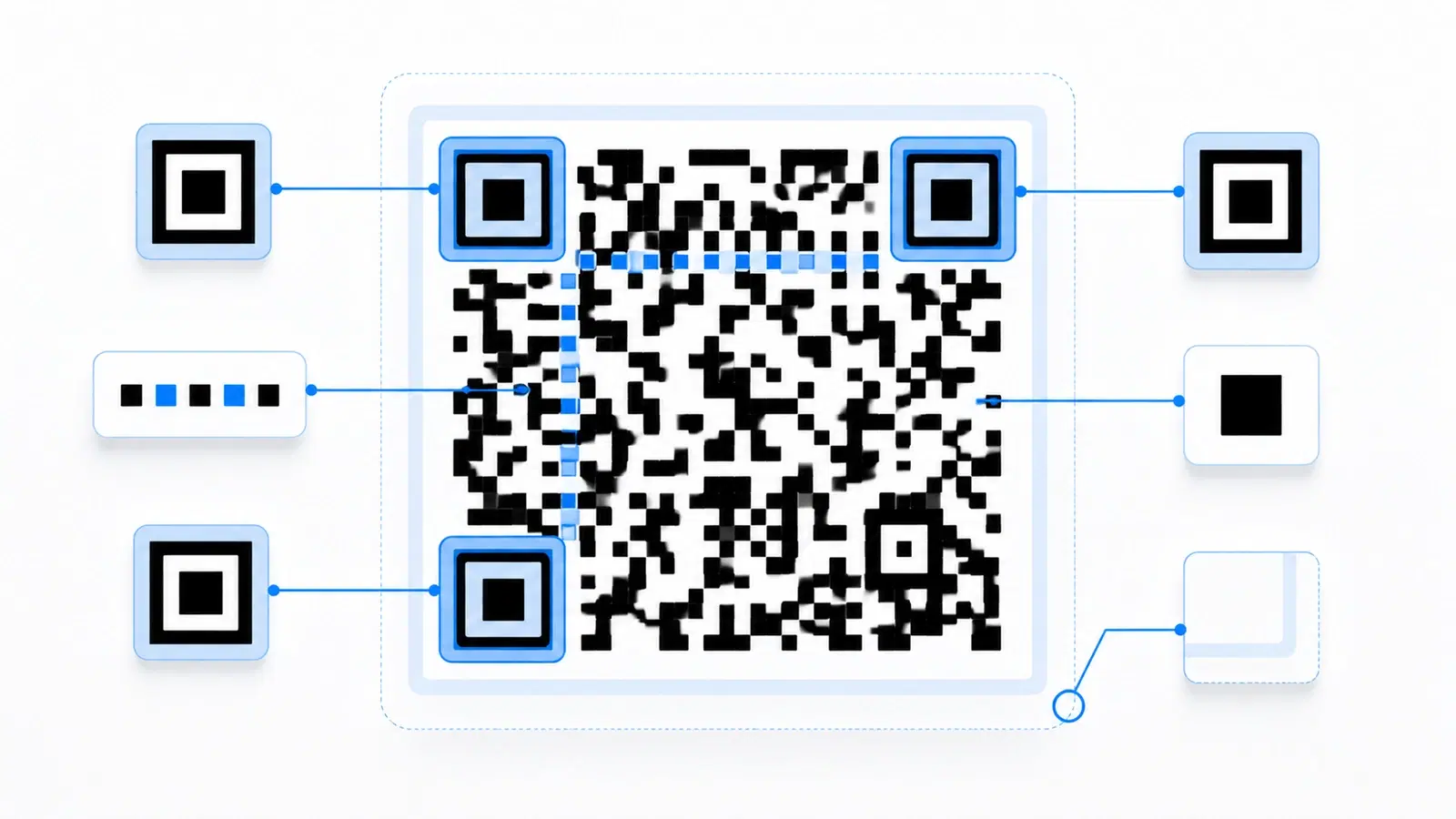
The three big squares in the corners (finder patterns): Those three large square shapes in three corners are the most recognizable part of a QR code. They are called finder patterns, and their job is orientation. They let the scanner instantly locate the code, figure out which way is up, and correct for the angle you are holding your phone. This is why a QR code scans from any rotation: the three corners tell the scanner how the code is oriented. (There are three, not four, precisely so the scanner can tell which corner is missing and thus determine orientation.)
The smaller squares (alignment patterns): Larger QR codes have smaller square patterns scattered within them, called alignment patterns. They help the scanner correct for distortion, like when the code is on a curved surface or photographed at an angle. They keep the grid readable even when it is warped.
The dotted lines (timing patterns): Running between the finder patterns are alternating black-and-white lines called timing patterns. They act like a ruler, helping the scanner count the exact rows and columns of modules so it reads the grid accurately.
The quiet zone (the white border): The empty white margin around the code is the quiet zone. It is not decoration; it is functionally required. It separates the code from surrounding visual noise so the scanner can tell where the code begins and ends. A QR code crammed against text or images often fails to scan because its quiet zone is violated.
The data area (everything else): All the remaining modules, the seemingly random pattern filling the rest of the code, is your actual encoded information plus its error correction data. This is where the link or content actually lives.
Knowing these parts, you can look at any QR code and see its structure: corners for orientation, patterns for accuracy, border for separation, and the rest for data.
Pro Tip
The white border (quiet zone) around a QR code is doing real work. It tells the scanner where the code starts and ends. This is why placing a QR code too close to text, images, or the edge of a page often makes it fail to scan. Always leave clear space around your codes.
How Your Phone Reads It (in a Fraction of a Second)
When you point your phone at a QR code and it opens a link almost instantly, a sequence of steps happens in well under a second. Here is what actually occurs:
Step 1: The camera sees the pattern. Your phone's camera captures the image of the QR code. Modern phone cameras detect QR codes automatically, no separate app needed, because the operating system is always watching for that recognizable pattern.
Step 2: It locates and orients the code. The scanner spots the three finder patterns (the corner squares) and uses them to locate the code and determine its orientation, correcting for any angle or rotation.
Step 3: It maps the grid. Using the timing patterns and alignment patterns, the scanner maps out the exact grid of modules, correcting for any distortion, and reads each module as a 1 or 0 (black or white).
Step 4: It decodes the data. The scanner converts that grid of 1s and 0s back into the original information using the QR code standard's rules, reconstructing the link, text, or other content.
Step 5: It checks and corrects for errors. Using the error correction data built into the code, the scanner verifies it read everything correctly and repairs any misreads or damage (more on this next). This ensures accuracy.
Step 6: It acts on the content. Finally, the phone does something with the decoded information: opens the link in a browser, offers to save the contact, connects to the WiFi network, and so on.
All six steps happen in a fraction of a second, which is why scanning feels instant. The "Quick Response" name is well earned.
- The camera captures the QR code image
- Finder patterns locate and orient the code
- Timing and alignment patterns map the module grid
- The grid of black/white squares is decoded into data
- Error correction verifies and repairs any misreads
- The phone acts: opens the link, saves the contact, connects WiFi
Why QR Codes Survive Damage
One of the most useful features of QR codes is that they still work even when scratched, smudged, partly covered, or printed with a logo on top. This is thanks to error correction, and understanding it demystifies a lot.
The core idea: When a QR code is created, extra redundant data is woven into the pattern alongside your actual information. This redundancy lets the scanner reconstruct the full original content even if part of the code is unreadable. It is like a sentence with enough context that you can still read it even if a few letters are smudged.
How much damage it survives: QR codes come in four error correction levels that can recover from roughly 7% up to about 30% of the code being damaged or missing. At the highest level, nearly a third of the code can be obscured and it still scans. This is exactly what makes logos possible: the logo covers part of the code, and error correction fills in the gap. We cover this fully in our error correction levels guide.
Why this design is brilliant: QR codes were built to work in the real world, where things get damaged. A code on a factory part gets dirty. A code on packaging gets scratched. A code on a poster gets rained on. Error correction means these codes keep working despite real-world wear, which is a big part of why QR codes are so practical and reliable.
The takeaway: The "random" pattern in a QR code is not just your data; a meaningful chunk of it is backup data that makes the code resilient. That resilience is a deliberate, clever part of the design, not an accident.
How Dynamic QR Codes Do Their Redirect Trick
There is one more piece that explains a lot of QR codes' real-world power: how dynamic QR codes can be updated after they are printed. This often seems the most magical part, but it is simple once explained.
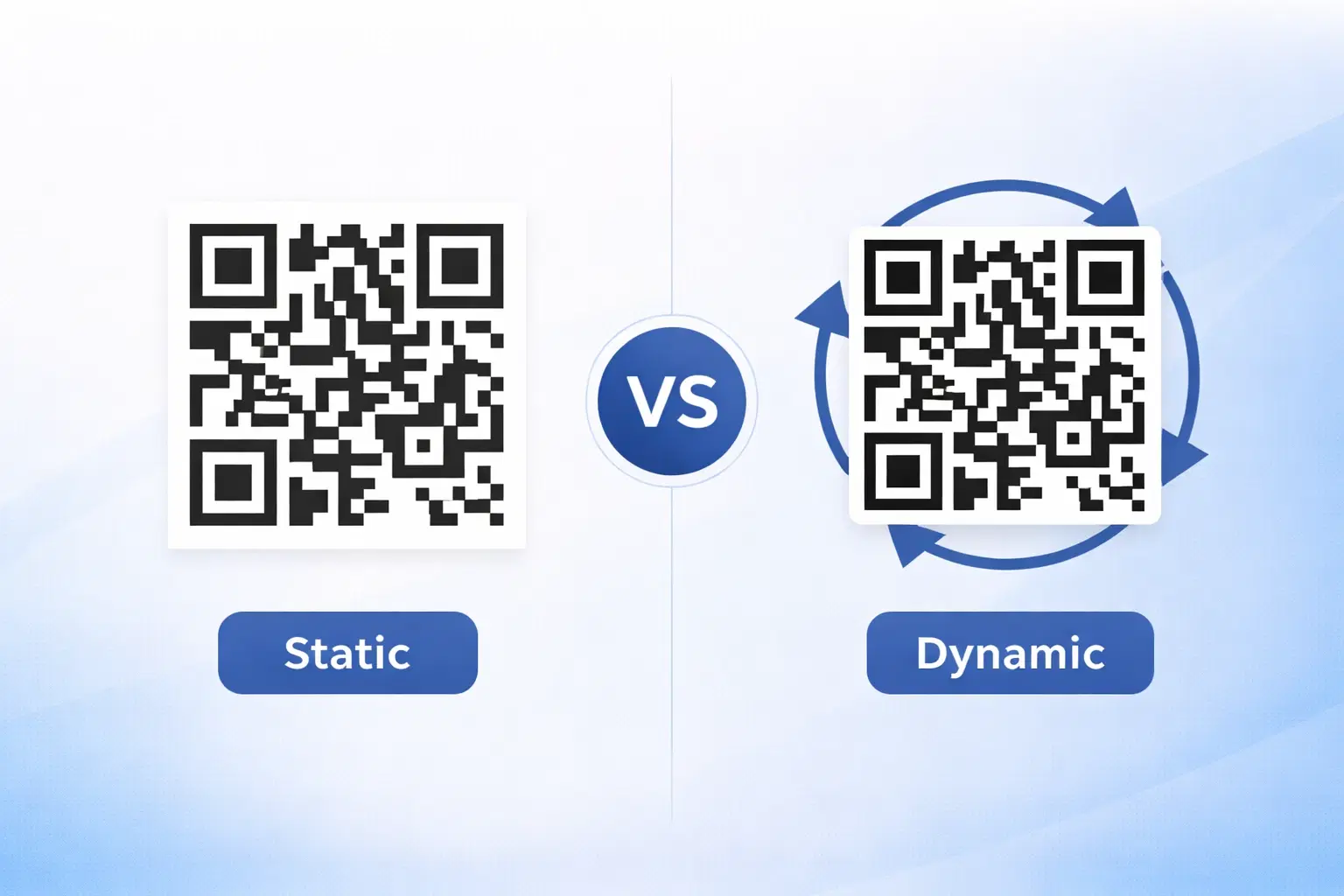
The difference between static and dynamic:
- A static QR code has your actual destination (say, a full website address) encoded directly into the pattern. The pattern and the destination are the same thing. Change the destination, and you must regenerate and reprint the whole code.
- A dynamic QR code has only a short redirect link encoded into the pattern (something like "qrforever.com/x7k2"). That short link does not go straight to your final destination; it goes to a redirect service that you control.
How the redirect works, step by step: 1. Someone scans your dynamic QR code 2. Their phone reads the short link encoded in the pattern 3. That short link takes them to the redirect service 4. The service looks up where you have currently pointed that link 5. It forwards the person to your actual destination
Why this is powerful: Because the QR code only contains the short redirect link (which never changes), you can change where that link points anytime, in the redirect service's dashboard. The printed code stays identical, but it can send people to a completely different destination tomorrow than it does today. Update the menu, fix a broken link, change a campaign, all without touching the printed code.
The everyday analogy: A dynamic QR code is like a phone extension. The extension number (say, 200) stays the same on the directory, but you can forward extension 200 to any phone in the building. Callers dial the same number; you control where it rings. The QR pattern is the extension; the redirect is the forwarding.
This redirect mechanism is what makes QR codes genuinely useful for business, because printed materials last for years while the things they point to change constantly. For the full picture, see our dynamic vs static QR codes guide and how to edit a QR code after printing.
Conclusion
QR codes are not magic; they are a well-designed system for storing information as a visual pattern a camera can read. The three corner squares handle orientation, the timing and alignment patterns keep the grid accurate, the quiet zone separates the code from its surroundings, and the rest holds your data plus the error correction that lets the code survive damage. Your phone runs through locating, mapping, decoding, error-checking, and acting, all in a fraction of a second.
Add in the redirect mechanism of dynamic QR codes, where the pattern holds a short link you can repoint anytime, and you have the full picture of why QR codes are so useful: they are quick to read, resilient to damage, universally supported, and (when dynamic) endlessly updatable.
The next time you scan a QR code, you will know exactly what those black-and-white squares are doing. And understanding how they work helps you make better ones: keep the quiet zone clear, use the right error correction, size them well, and use dynamic codes so you stay in control.
Related reading:
Create your own QR code with QRForever. Start a 7-day full-access trial, no credit card needed. Now that you know how they work, make a dynamic one you can update anytime.
Explore QRForever Solutions
Ready to Create Your Own QR Codes?
Start creating dynamic QR codes for your business today. Track analytics, update content anytime, and never reprint again.
Related Articles
Dynamic vs Static QR Codes: Which One Should You Use? (Updated 2026)
The complete 2026 guide to dynamic vs static QR codes: when each type is right, the hidden costs of choosing wrong, and a decision framework you can apply in 60 seconds.
QR Code Payments Explained: How They Work and Why They Matter (Updated 2026)
QR code payments crossed record transaction volumes in 2025 and are now infrastructure, not novelty. Understand how they work: merchant-presented vs consumer-presented, UPI, security, and what it means for your business. Updated June 2026.
QR Codes That Never Expire: Why Most Free QR Codes Stop Working (Updated 2026)
Free QR codes often expire after 14–90 days, breaking printed materials and costing more in reprints than a paid plan ever would. Updated 2026 guide with platform expiry timelines and a step-by-step rescue plan.