QR Code Customization
Create branded QR codes that stand out. Add your logo, choose custom colors, and design QR codes that perfectly match your brand identity.
Customization Options
Everything you need to create professional, branded QR codes
Brand Colors
Match your QR code to your brand colors. Choose foreground and background colors that align with your brand identity.
Logo Integration
Add your company logo to the center of your QR code. Our system ensures the code remains scannable while showcasing your brand.
Corner Styles
Choose from square, rounded, or dot-style corners to give your QR code a modern or classic look.
Dot Patterns
Select different dot patterns for your QR code modules: squares, circles, or custom shapes for a unique appearance.
Background Options
Use solid colors or transparent backgrounds. Perfect for placing QR codes on any colored surface or material.
Frame & Call-to-Action
Add frames around your QR code with customizable text like "Scan Me" or your own call-to-action message.
Why Customize Your QR Codes?
Increased Brand Recognition
Branded QR codes are 80% more likely to be scanned than generic black and white codes.
Professional Appearance
Custom QR codes elevate your marketing materials and show attention to detail.
Better Engagement
Eye-catching designs attract more attention and encourage users to scan.
Perfect For
Customized QR codes work great across all industries
Marketing Materials
Create branded QR codes for brochures, posters, and business cards that match your corporate identity.
Product Packaging
Design QR codes that complement your product packaging while maintaining brand consistency.
Event Badges
Generate personalized QR codes for events with your event logo and theme colors.
Restaurant Menus
Match your menu QR codes to your restaurant's branding and ambiance.
Social Media
Create QR codes that match your social media aesthetic and brand presence.
Retail Stores
Design in-store QR codes that blend with your retail environment and branding.
See Our Customization Tool in Action
Explore the intuitive interface that makes creating branded QR codes effortless
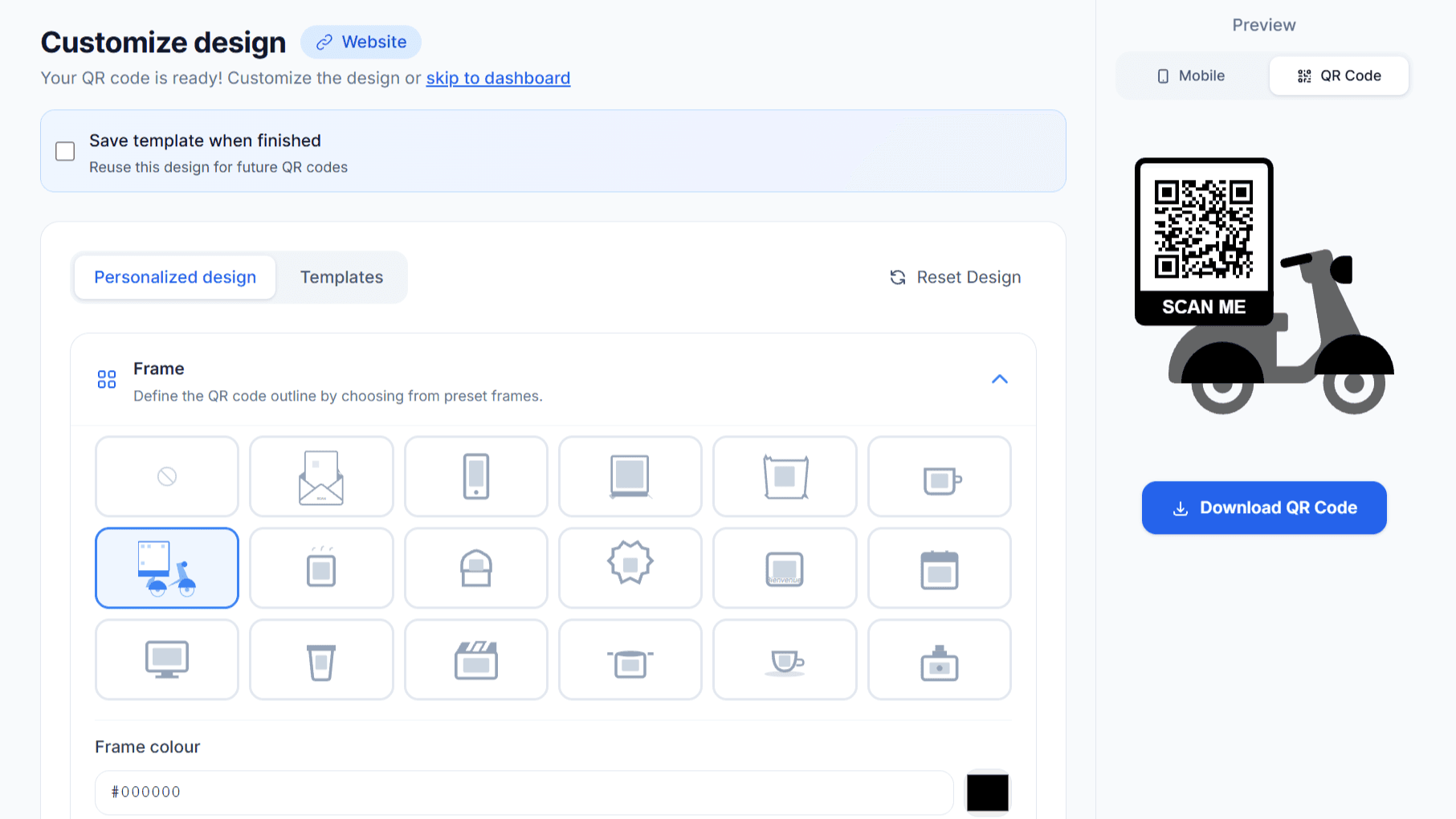
Choose from multiple frames, patterns, and styles
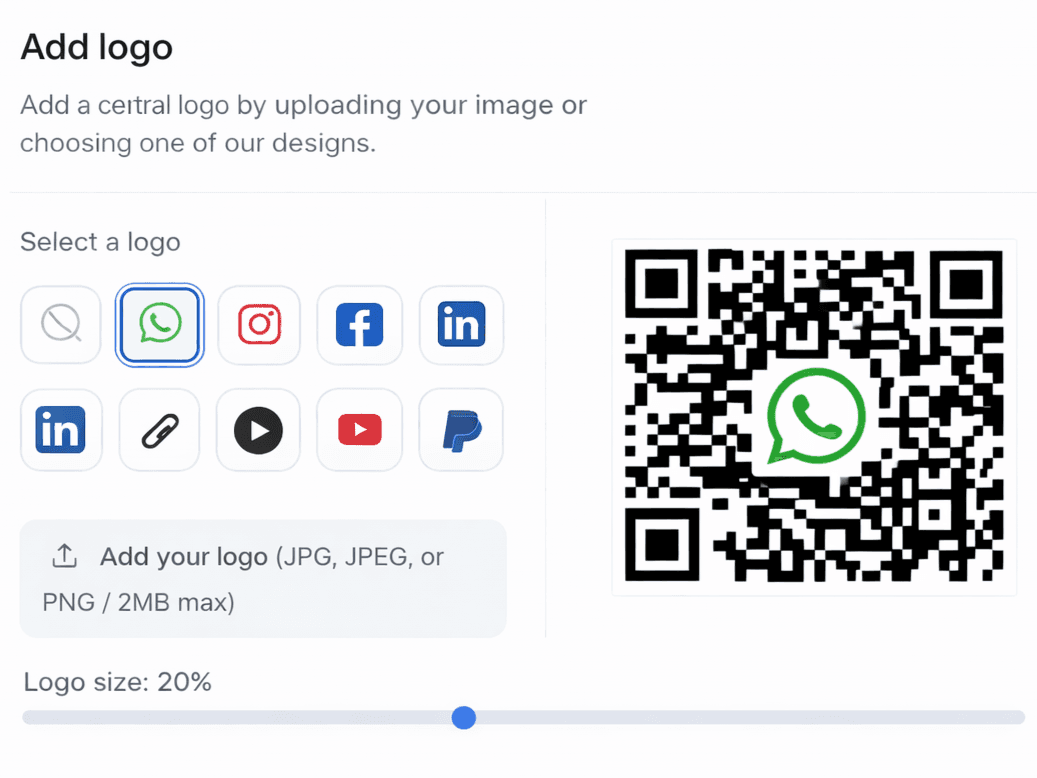
Add your logo and customize brand colors
Ready to Create Your Custom QR Code?
Try our intuitive customization tool now. No design skills required, just select your options and watch your branded QR code come to life.
Start Customizing NowHow to Customize Your QR Code in QRForever
Create a branded, scannable QR code in four steps
Pick Type and Content
Choose your QR type (URL, vCard, WhatsApp, and more) and enter your destination.
Choose Colors
Open the Style tab and pick a foreground color. Keep dark modules on a light background with contrast above 4:1.
Add Logo
Upload your logo (PNG with a transparent background works best). Keep it under 30% of the code area.
Style and Download
Choose a corner style (square, rounded, or dot), then download SVG for print or PNG for digital.
Tip: Always scan-test your customized code on at least two devices before printing at scale. Pairing customization with a dynamic QR code lets you edit the destination later, and scan analytics show whether your branded codes drive more engagement.
Create a free QR codeCustomization Rules That Keep Your Code Scannable
Design freedom is great, but a code has to scan first. Follow these rules before you print.
Contrast
Use dark modules on a light background, never the reverse. Light dots on a dark background reduce scan reliability on older cameras.
Logo Size
Keep your logo under 30% of the code area. Error correction level H can recover a code with up to about 30% obscured.
Color Pairings
Avoid low-contrast combinations like red on green or yellow on white. They can fail in bright light or on lower-quality cameras.
Gradients
Horizontal gradients tend to be safer than vertical ones. Always scan-test before committing a gradient design to print.
File Format
Use SVG for large-format printing so the code stays sharp at any size. For digital, export PNG at 1000px or larger.
Test Before Print
Scan the final design on both iOS and Android, in different lighting, and at the size you will actually print.
Start Creating Custom QR Codes Today
Make your QR codes stand out with professional customization options.
The Complete Guide to QR Code Customization
Custom QR codes transform generic black-and-white squares into powerful brand assets. With modern QR code customization tools, you can create codes that match your brand identity, capture attention, and significantly increase scan rates. Studies show that branded QR codesare scanned more often than standard black-and-white codes, making customization not just an aesthetic choice but a strategic business decision. You can try every design tool below free in our free QR code generator.
Understanding QR Code Design Elements
A custom QR code generator offers several design elements you can modify:
- Foreground color: the color of the QR modules (dots). Choose brand colors that maintain sufficient contrast with the background.
- Background color: the space between modules. White is standard, but lighter brand colors can work with dark foregrounds.
- Module shape: transform traditional squares into circles, rounded squares, or custom shapes for a modern look.
- Finder patterns: the three corner squares that help scanners locate the code. These can be customized independently.
- Logo placement: add your company logo to the center while maintaining scannability through error correction.
- Frame and CTA: add borders and call-to-action text like "Scan Me" or "Learn More".
Adding Your Logo to QR Codes
QR codes with logos are the most recognizable and trusted by consumers. When you add a logo to a QR code, you're leveraging existing brand recognition to encourage scans. Users who see a familiar logo in a QR code feel more confident about what they'll find when they scan it.
Our QR code maker automatically adjusts error correction levels to accommodate your logo without compromising scannability. The recommended logo size is typically 15-20% of the total QR code area. Larger logos require higher error correction, which can make the code more complex and potentially harder to scan at small sizes.
Color Selection Best Practices
When choosing QR code colors, contrast is crucial. The foreground should always be significantly darker than the background. QR readers rely on this contrast to decode the pattern. While you can reverse this (light dots on dark background), it may reduce compatibility with older QR readers.
Avoid using similar colors for foreground and background (like light blue on white or dark blue on black). Also avoid gradients that reduce contrast at certain points. Test your personalized QR codeon multiple devices before printing to ensure reliable scanning across different cameras and lighting conditions.
Industry-Specific Branding Considerations
Different industries benefit from different QR code design approaches:
- Corporate/B2B: clean, professional designs with company colors and logos. Minimalist styling conveys trustworthiness.
- Retail: vibrant colors and promotional frames that grab attention in busy store environments.
- Restaurants: elegant designs that complement table settings without being overly branded.
- Events: bold, eye-catching designs that stand out on badges, posters, and promotional materials.
- Healthcare: clean, clinical designs with calming colors that inspire trust and professionalism.
- Real Estate: property-appropriate designs. Luxury listings might feature gold accents while family homes use warm colors.
Maintaining Scannability While Customizing
The goal of QR code branding is to enhance visual appeal without sacrificing functionality. QRForever's custom QR generator automatically maintains the technical requirements for reliable scanning. However, always test your customized codes before mass production. Scan on multiple phones (iOS and Android), in different lighting conditions, and at the size you'll actually print.
Customization + Dynamic = Perfect Combination
For maximum value, combine QR code customization with dynamic QR codes. Your beautifully branded QR code can be updated to point to different URLs over time, no redesigning or reprinting needed. Add analytics to measure whether your branded codes actually drive more engagement than generic ones, and see how to deploy them across QR codes for marketing campaigns.
Custom QR Code Questions
Can I add my logo to a QR code without affecting scannability?
Yes. QRForever uses error correction level H, which allows up to 30% of the code to be obscured. Keep your logo under 30% of the total code area and scan-test on multiple devices before printing.
Will changing the QR code colors break it?
Color changes are safe as long as you keep contrast. Dark modules on a light background (contrast ratio above 4:1) scan reliably. Avoid very light colors for the modules or very dark backgrounds, which can reduce scan reliability.
What logo file format should I use?
A PNG with a transparent background is recommended. This prevents a white box from appearing around your logo inside the code. SVG is ideal for high-resolution and large-format exports.
Can I customize a QR code after it has been printed?
You can change the destination URL of a dynamic QR code anytime without changing the visual code. You cannot change the visual design (colors or logo) after the code is generated and printed; for a new look you would generate a new code.
How do I customize a QR code with my logo and colors?
Create or select your QR code, open the style options, then set a foreground color, an optional background color, and upload a logo for the center. Pick a corner and dot style to finish, keep dark modules on a light background, and scan-test before you print. You can do all of this free in the QRForever generator.
What are the best colors for a QR code?
Dark modules on a light background scan the most reliably. Aim for a contrast ratio above 4:1 between the modules and the background. Brand colors work well as long as the foreground stays clearly darker than the background. Avoid low-contrast pairings like yellow on white or red on green.
Can I add a logo to a QR code for free?
Yes. Logo, color, and style customization is included on every QRForever plan, including the free static generator. There is no separate charge to brand your code. Paid plans add dynamic editing and scan analytics, not the design tools.
Does customizing a QR code make it harder to scan?
Not if you follow a few rules. Keep enough contrast, keep the logo under about 30% of the code area, and rely on error correction level H when a logo is present. A well-made custom code scans just as fast as a plain one. Always test on both iOS and Android before printing at scale.