QR Codes for Nonprofits: Fundraising, Volunteer Sign-Up, and Donor Engagement in 2026
Nonprofits are using QR codes to increase donations, simplify volunteer registration, and boost event engagement. Here's a practical implementation guide for organizations of any size.

Nonprofits operate under a fundamental constraint: limited staff, limited budget, and the constant need to convert awareness into action: whether that action is a donation, a volunteer registration, or an event RSVP.
QR codes address all three. They remove friction from every touchpoint where a supporter might otherwise drop off. A donor who would have looked up your website later and forgotten can donate in the moment, at the gala table, with a single scan. A potential volunteer who glances at your flyer can sign up before they reach the end of the block.
This guide covers the most impactful ways nonprofits are using QR codes in 2026, with practical setup instructions and real-world placement strategies.
Donation QR Codes: Accept Gifts in the Moment
The most valuable application for most nonprofits. A donation QR code links directly to your donation page: bypassing the search, the navigation, and the "I'll do it later" that kills most donation intent.
What to link your donation QR code to:
- Your organization's primary donation page (website or platform)
- A specific campaign page (more effective for event fundraising: shows progress toward a goal)
- A payment platform like PayPal Giving Fund, Stripe, Donorbox, or GiveLively
- If you accept UPI (India). Link to your UPI QR or a UPI deep link
Creating an effective donation QR code: 1. Use the direct URL to your donation form, not your homepage 2. On QRForever, create a URL QR code and customize with your organization's colors and logo 3. Add a specific campaign name in the URL if your platform supports it (e.g., ?campaign=gala2026). This lets you track which QR codes drove the most donations 4. Download as SVG for print. Donation QR codes go on everything
Copy to use alongside the QR code: > "Scan to donate. 100% goes directly to [cause]" > "Every dollar counts. Scan to give in 30 seconds." > "Support [Organization Name] tonight: scan to make your gift"
Pro Tip
If your donation page has a progress bar or campaign goal tracker, the QR code is even more powerful: donors can see real-time impact of their gift alongside the ask.
Volunteer Sign-Up QR Codes
Volunteer recruitment suffers the same friction problem as donations. Someone sees your tabling booth at a community event, is genuinely interested, but doesn't sign up because the form takes too long or they don't have a pen.
A QR code linked to your volunteer application or interest form eliminates that barrier.
Platform options for volunteer forms:
- VolunteerHub / SignUpGenius: dedicated volunteer management with QR-compatible links
- Google Forms: free, mobile-friendly, instant setup
- Airtable. More structured if you need role-specific sign-ups
- Your website's existing form. Simplest if already mobile-optimized
Multi-role volunteer sign-ups: If you need volunteers for specific roles or shifts, create a separate QR code for each role that links to a pre-filtered sign-up page. Display them at your event or on a board: [Scan for Kitchen Volunteers], [Scan for Registration Desk], etc.
Event-specific vs ongoing volunteer QR codes:
- Ongoing: Dynamic QR code pointing to your general volunteer interest form. Update it anytime.
- Event-specific: QR code pointing to the specific event's sign-up page. Create one per major event for cleaner tracking.
Placement for Volunteer Recruitment
Community events and tabling: A4 or A5 sign with QR code and "Join our volunteer team" headline. Placed at the front of your table, visible from 2 meters away.
Office buildings and community centers (with permission): Tear-off flyers with QR code and volunteer details. Each tear-off includes the QR code.
Social media posts: A QR code in a post image works for audiences viewing on desktop. For mobile-first audiences, also include the direct link.
Partner organizations: Share your volunteer QR code with aligned organizations for cross-promotion. Simple to distribute digitally, unlike a signup form URL.
Event Engagement QR Codes
Nonprofit events (galas, charity runs, awareness walks, community dinners) are high-value touchpoints where attendees are already emotionally engaged. QR codes turn that engagement into action.
Registration and check-in: Replace paper sign-in sheets with a QR code at the entrance. Link to a Google Form or event management system. Faster, searchable, and no data entry after the event.
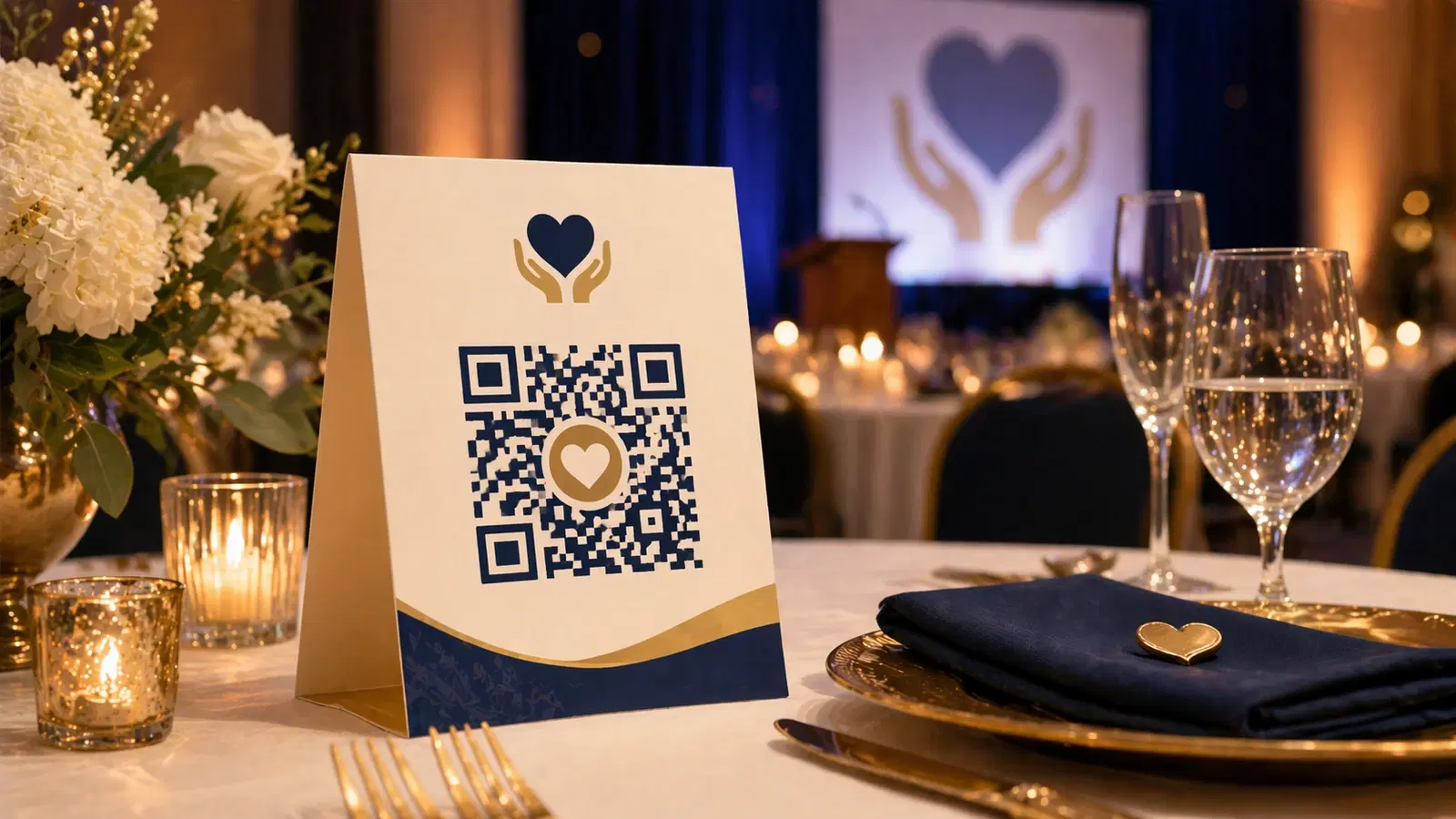
Event-specific donations: Table cards with donation QR codes. During keynote speeches or emotional moments, ask guests to "scan the code on your table right now." Synchronized asks during peak emotional engagement consistently outperform generic asks.
Auction and bidding: Silent auction items with QR codes linking to bidding forms or apps like GiveSmart or OneCause. Removes the need for staff to manage paper bid sheets.
Program and agenda: Replace printed programs with a QR code linking to a live digital agenda. Eco-friendly, always up-to-date, and you can include speaker bios, sponsor recognition, and impact stories with no printing cost.
Social sharing walls: A QR code that opens a pre-populated social media post: "I'm at [Event] supporting [Cause] tonight! [link]". Lowers the barrier for attendees to share on social.
Feedback after events: Follow-up email with QR code linking to feedback form. Higher completion rate than asking people to navigate to a URL.
- Print QR codes large enough to scan from a standing position: minimum 5cm × 5cm for table centerpieces
- Always include what the QR code does: "Scan to donate", "Scan to register", never just a QR code alone
- Test every QR code on both iPhone and Android the day before the event
- Have a backup plan (printed URL or staff with a phone) in case of Wi-Fi issues at the venue
- Track scan counts in QRForever analytics: tie scan peaks to event timeline to learn what drove action
Impact Reporting and Donor Communication
Donors who receive impact updates renew at significantly higher rates. QR codes in your donor communications make impact tangible and interactive.
Annual report with QR codes: Printed annual reports are expensive and rarely read front-to-back. Include QR codes that link to video testimonials, interactive impact maps, or specific program pages. Turn the report into an entry point, not a destination.
Donor thank-you cards: A handwritten thank-you note with a QR code linking to a short video from the field: "See what your gift is doing right now." High emotional impact, low cost.
Newsletter inserts: Physical newsletter mailings can include QR codes linking to extended content online: full stories, photo galleries, video updates. Better than cramming everything into a printed piece.
Year-end giving campaigns: Direct mail year-end appeals with a QR code linking to a campaign-specific donation page. Track scan-to-donation conversion to measure print campaign ROI.
Pro Tip
A QR code linking to a 60-second video from the field outperforms almost any other donor communication format. If you can film one genuine moment of impact per quarter, use a QR code to deliver it in every touchpoint.
Technical Setup: Creating Nonprofit QR Codes That Last
Why dynamic QR codes matter for nonprofits: Nonprofit campaigns change. Donation pages get redesigned. Volunteer forms are updated. Events end and new ones begin. With dynamic QR codes from QRForever, you can update the destination URL anytime, without reprinting materials.
This is critical for organizations with limited print budgets. A dynamic QR code on a standing banner points to the right page year after year. Swap the destination in QRForever when the campaign changes, and the physical banner is still accurate.
Analytics for grant reporting: Some funders are beginning to accept digital engagement metrics as part of impact reporting. QRForever's scan analytics (total scans, unique devices, geography, time trends) can supplement traditional metrics when reporting on outreach campaigns.
Branding your QR codes: Add your organization's logo to the center of every QR code. Use your brand colors. Many nonprofits use one primary color consistently. This makes QR codes instantly recognizable as yours and builds trust with donors who see them repeatedly.
Budget considerations: QRForever starts with a 7-day full-access free trial (no credit card). Unlimited dynamic QR codes and analytics while you try it. For organizations running multiple campaigns long-term, a paid plan gives you dynamic codes you can edit anytime with analytics per code. If you only need a single static link that never changes (like a general donation page), you can also generate a free static QR with no signup.
A Simple Implementation Checklist for Nonprofits
Getting started (this week): 1. Create your primary donation QR code linking to your main donation page 2. Customize with your brand colors and logo 3. Download SVG version for print 4. Place on your website's contact page, in your email signature, and on any physical materials
For your next event: 1. Create an event-specific donation QR code (different URL for tracking) 2. Create a volunteer sign-up QR code if recruiting at the event 3. Print table cards with donation QR code and CTA copy 4. Brief your team on how to encourage scanning during the event 5. Pull scan analytics after the event to measure engagement
For ongoing donor communications: 1. Add your donation QR code to thank-you cards 2. Create a QR code for your most recent impact story or video 3. Include in quarterly mailings and newsletters
What to track:
- Total scans per QR code
- Scan-to-donation conversion (compare with your donation platform data)
- Which placements drove the most scans (table cards vs banner vs direct mail)
- Device breakdown (helps optimize: if mostly iOS, ensure your page loads fast on Safari)
- Identify your single most important action (donation, volunteer signup, event RSVP)
- Create a dynamic QR code for that action on QRForever
- Test on three different phones before printing anything
- Deploy at one high-traffic physical touchpoint first
- Measure scan count after two weeks
- Expand to additional placements based on what you learn
Conclusion
QR codes are one of the most cost-effective tools available to nonprofits. The technology is free to use at basic scale, requires no hardware beyond phones your supporters already own, and removes friction from every critical action: donating, volunteering, registering, and engaging.
The organizations that see the best results don't treat QR codes as an add-on. They design their physical touchpoints around them: table cards built for scanning, banners positioned at eye level, direct mail pieces with a single clear ask and a QR code to act on it immediately.
Start with your donation QR code. Put it everywhere donors and supporters encounter your organization. Then expand from there.
Create your nonprofit QR codes on QRForever: branded designs, dynamic links you can update anytime, and analytics to measure your campaigns. Free trial available, no credit card required.
Explore QRForever Solutions
Ready to Create Your Own QR Codes?
Start creating dynamic QR codes for your business today. Track analytics, update content anytime, and never reprint again.
Related Articles
QR Code Menus for Restaurants: The Complete Setup Guide (Updated 2026)
Step-by-step guide to implementing QR code menus in your restaurant. Covers menu format options, placement strategy, staff training, and the one mistake that causes reprints. Updated May 2026.
QR Codes for Events: Conferences, Trade Shows & Beyond (Updated 2026)
QR codes turn events from logistical pain into smooth data-rich experiences: instant check-in, smart networking, lead capture for exhibitors, and post-event ROI you can actually prove. Updated May 2026 with the current best practices.
QR Codes on Product Packaging: Engaging Consumers Beyond the Shelf (Updated 2026)
Product packaging is your most-distributed marketing surface. Every unit on every shelf, in every home. QR codes turn that surface into a measurable, updatable channel for engagement, loyalty, and product education. Updated September 2026.