QR Codes for Tourism & Museums: Audio Guides, City Tours & Exhibit Information in 2026
Museums, historic sites, and tourism boards are replacing expensive audio guide hardware with QR codes. Here's how to set up self-guided tours, exhibit info, and multilingual experiences.

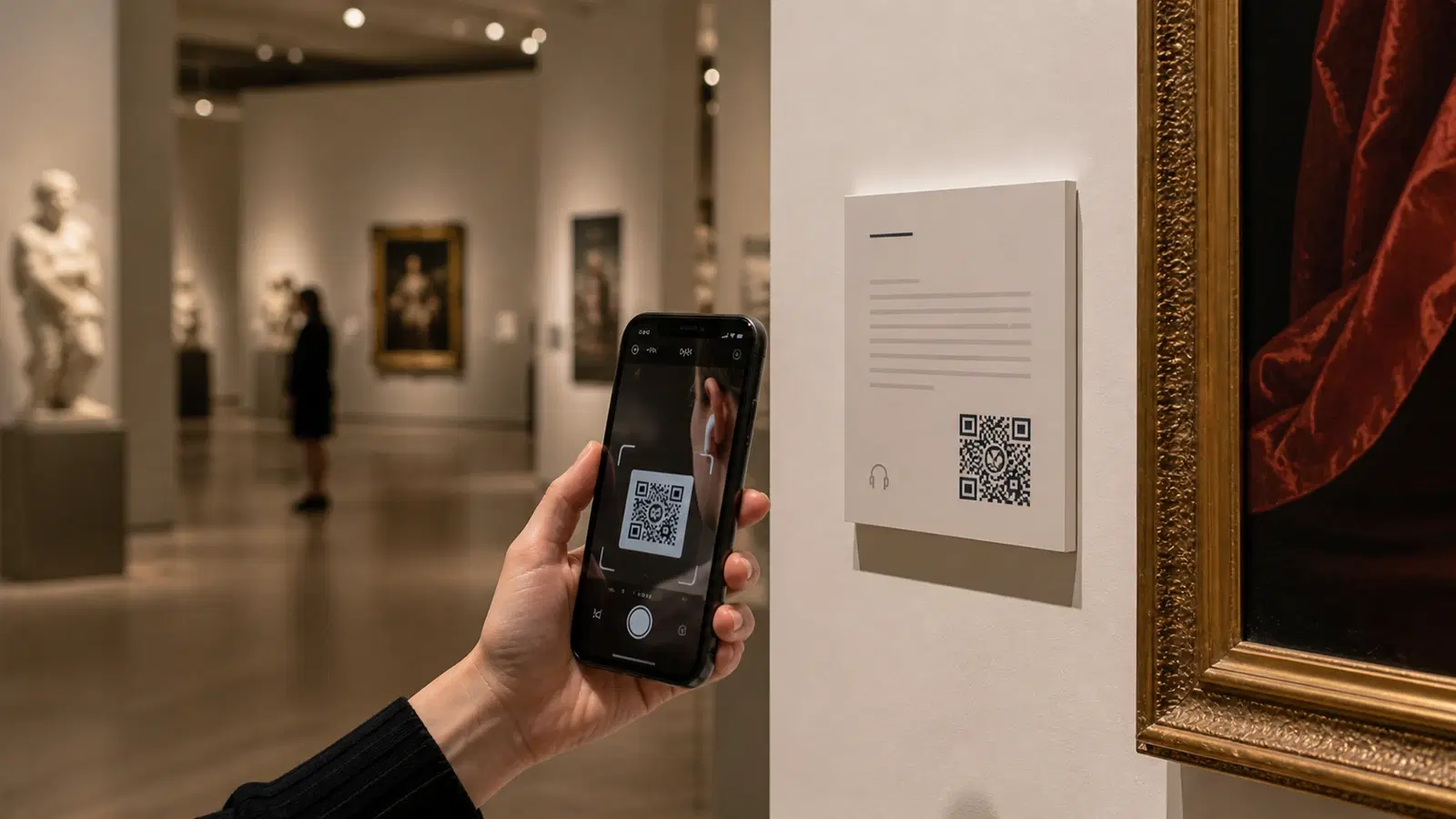
Traditional audio guide devices cost museums thousands of dollars to purchase, maintain, and sanitize. They break, they need charging, and visitors spend 10 minutes at the welcome desk learning how to use them before seeing a single exhibit.
QR codes eliminate all of that. A small code beside each exhibit links to an audio narration, a video explanation, detailed artwork information, or an interactive experience. All delivered on the visitor's own phone. No hardware to buy, no devices to sanitize, no batteries to charge.
For city tourism boards, QR codes on monuments, heritage buildings, and walking trail markers turn an entire city into a self-guided tour. For small museums that could never afford audio guide systems, QR codes make rich interpretation accessible at near-zero cost.
This guide covers implementation strategies for museums, galleries, heritage sites, and tourism organizations: from single-exhibit labels to city-wide walking tours.
Replacing Audio Guide Hardware with QR Codes
The traditional audio guide model (dedicated handheld devices with numbered stops) was designed for a world before smartphones. It has real problems:
- Cost: Devices cost between 200–500 dollars each. A museum needs one for every concurrent visitor.
- Maintenance: Batteries die, headphone jacks break, devices get lost or stolen.
- Hygiene: Post-pandemic, shared devices require cleaning between uses.
- Friction: Visitors must queue at the desk, leave an ID, learn the device, and return it afterward.
- Updates: Changing the audio content requires re-recording and re-loading onto every device.
QR code alternative: A QR code beside each exhibit links to a web page with an audio player, text description, images, or video. Visitors use their own phones and earbuds. Content is hosted online and can be updated instantly.
What you need: 1. Audio or text content for each stop/exhibit 2. A simple website or platform to host the content 3. One QR code per stop, created on QRForever 4. Printed labels or plaques beside each exhibit
Hosting options for audio content:
- SoundCloud, Free hosting for audio files. Each track gets a shareable URL.
- YouTube (unlisted videos), For video narrations. Free and reliable.
- A simple web page. HTML page with an embedded audio player and text. Can be hosted on any web hosting.
- Google Sites: Free, easy to build, mobile-friendly pages with embedded audio.
- Dedicated museum guide platforms: Bloomberg Connects, MuseumAnywhere, or similar (for larger institutions).
The cheapest viable setup: Record narrations on a smartphone, upload to SoundCloud, create a QR code for each track on QRForever, print labels. Total cost: effectively zero beyond the QRForever subscription for multiple codes.
Pro Tip
Keep audio narrations between 60–90 seconds per stop. Visitor attention drops sharply after 2 minutes. Short, engaging narrations are listened to completely; long ones get skipped.
Museum and Gallery Implementation
Label design for exhibits:
The QR code should be integrated into or placed near the existing exhibit label. Design guidelines:
Size: 2.5cm x 2.5cm minimum. Visitors scan from approximately 30–50cm away while leaning toward an exhibit.
Position: Bottom-right or bottom-left of the exhibit label. The label hierarchy should be: title → artist/date → medium → QR code. The code supplements the label, it doesn't replace it.
Visual cue: Include a small icon (headphone symbol or play button) beside the QR code with text: "Scan for audio guide" or "Learn more."
Color: Match the QR code color to the museum's brand or the label design. A dark code on a white/cream label works best.
Content structure for each exhibit page:
When a visitor scans, the page should load fast and be immediately useful: 1. Exhibit title and artist name (confirms they scanned the right code) 2. Audio play button (prominent, easy to tap) 3. Written description (for visitors who prefer reading or can't use audio) 4. High-resolution image of the artwork (for zoom-in details) 5. Related exhibits in the museum (encourages continued exploration) 6. Optional: artist biography, historical context, acquisition story
Multilingual support: This is where QR codes dramatically outperform hardware audio guides. A single web page can offer a language selector at the top. Visitors choose their language and get the narration in English, Hindi, French, Mandarin, or any language you've prepared. Adding a new language is just adding content to the page: no new hardware, no new device programming.
Temporary and Rotating Exhibitions
QR codes are perfect for temporary exhibitions because the setup is fast and the codes are disposable.
For a 3-month temporary exhibition: 1. Create QR codes for each exhibit on QRForever 2. Print on high-quality label stock 3. Affix to temporary exhibit labels 4. When the exhibition ends, remove the labels 5. The QR codes can be deactivated or redirected to a "This exhibition has ended" page
For rotating permanent collections: Use dynamic QR codes that you update when a piece is rotated out. The label stays the same, but the QR code destination changes to reflect the new artwork in that position. This is only possible with dynamic codes: static codes would need reprinting every rotation.
Self-Guided City Tours with QR Codes
Tourism boards and local governments are deploying QR codes on monuments, heritage buildings, walking trail markers, and public art installations to create self-guided tours.
How it works: A small plaque or sticker with a QR code is installed at each point of interest. Visitors scan and receive historical information, audio narration, photos, or directions to the next stop on the tour.
Tour structure options:
Linear tour (numbered stops): Each QR code links to a page that includes "Next stop: [name], 200 meters north" with a map link. Visitors follow the sequence. Best for heritage walks with a clear narrative arc.
Choose-your-own tour: Each QR code links to a standalone page about that location, plus a map showing all other stops. Visitors explore in any order. Better for city centers with scattered attractions.
Themed tours: Multiple QR codes at the same location, each for a different theme: "Architecture Tour," "Food & Markets Tour," "Historical Figures Tour." Visitors choose which narrative interests them.
Implementation for municipal tourism:
1. Identify stops. 10–20 stops is ideal for a walking tour. More becomes overwhelming. 2. Create content. Write 100–200 word descriptions per stop. Record 60–90 second audio narrations. Include one historical photo if available. 3. Build pages. Simple web pages for each stop. Google Sites, WordPress, or a dedicated tourism platform. 4. Create QR codes, One per stop on QRForever. Name them clearly (e.g., "Stop 7, Old Town Hall"). 5. Install plaques: Weatherproof plaques with the QR code, stop name, and tour name. Stainless steel or UV-resistant acrylic for outdoor durability. 6. Promote the tour: Visitor centers, hotel lobbies, and airport arrivals should have a poster with a QR code that links to the tour overview page with a map of all stops.
Real-world durability: Outdoor QR codes need to survive rain, sun, and vandalism. Use engraved metal plaques, UV-printed aluminum, or industrial-grade vinyl with anti-graffiti lamination. A paper sticker will last 2 weeks outdoors.
Important
Outdoor QR codes must be tested in direct sunlight. Glare on glossy surfaces can make scanning impossible. Use matte finishes for outdoor plaques.
Visitor Engagement Beyond Information
QR codes in tourism settings can do more than deliver information. They can create interactive experiences.
Scavenger hunts and gamification: Create a scavenger hunt across museum galleries or city landmarks. Each QR code reveals a clue or question. Visitors who scan all codes and answer correctly earn a reward (gift shop discount, free postcard, entry into a draw). This dramatically increases the number of exhibits visitors engage with.
Visitor feedback per exhibit: A QR code at each major exhibit linking to a one-question poll: "Rate this exhibit (1–5 stars)" or "Would you like to see more of this artist? Yes/No." Gives curators data they've never had before, which exhibits visitors actually care about.
Augmented reality (AR) triggers: Some QR codes can link to web-based AR experiences. A code beside a dinosaur skeleton links to a page that renders a life-sized animated dinosaur in the visitor's phone camera. Memorable, shareable, and doesn't require an app.
Social sharing prompts: A QR code in front of a photogenic exhibit or landmark: "Take a photo here and share on Instagram with #[MuseumName]." The code can link to a page that opens the camera or pre-populates a social media post.
Donation and membership QR codes: Place donation QR codes in galleries where visitors are most emotionally engaged. Near powerful exhibits, at the end of a moving audio guide. "This collection was made possible by donors like you. Scan to support."
Gift shop and merchandise: A QR code beside a popular exhibit linking to the gift shop's page for related merchandise: prints, books, postcards. Visitors who love the exhibit can buy related items without remembering to look in the gift shop later.
Technical Considerations for Large Deployments
Museums and tourism boards deploying dozens or hundreds of QR codes need a systematic approach.
Naming convention: Adopt a consistent naming scheme in QRForever:
- Museum: "Gallery-2-Exhibit-14-Monet-Water-Lilies"
- City tour: "Heritage-Walk-Stop-07-Old-Town-Hall"
- This makes managing and updating large numbers of codes practical.
Content management: Use a spreadsheet as your master document: | Stop # | Name | QR Code ID | Destination URL | Audio File | Last Updated | Maintain this as the single source of truth. When content changes, update the URL in QRForever and update the spreadsheet.
Analytics and reporting: QRForever's per-code analytics show scan counts per code. For museums, this reveals:
- Which exhibits are most engaging (highest scan rates)
- Which galleries are underperforming (low scan rates)
- Peak visiting hours and days
- Device and language preferences of visitors
This data is valuable for exhibition planning, staff allocation, and grant reporting.
Wi-Fi considerations: Museum visitors need internet access to load QR code destinations. Options:
- Provide free Wi-Fi (most museums already do)
- Ensure your content pages are lightweight (under 500KB per page)
- Include a note on labels: "Free Wi-Fi: [network name], No password"
- For locations without reliable connectivity, consider QR codes that link to downloadable offline content
Accessibility:
- Ensure QR code labels are at wheelchair-accessible height (90–120cm from floor)
- Provide text alternatives for audio content on the linked page
- Use high-contrast QR code colors for visitors with low vision
- Include a text URL alongside the QR code for visitors who cannot scan
Conclusion
QR codes are the most cost-effective interpretation technology available to museums, galleries, and tourism organizations. They eliminate the capital cost and maintenance burden of audio guide hardware while delivering a better experience: multilingual, always updated, interactive, and using the device visitors already carry.
For small museums, QR codes make professional audio guides financially possible for the first time. For large institutions, they reduce hardware costs and provide visitor engagement data that was previously impossible to collect. For tourism boards, they turn an entire city into an interactive, self-guided experience.
Start with 5–10 QR codes on your most important exhibits or landmarks. Measure scan rates, gather feedback, and expand from there.
Create your museum and tourism QR codes on QRForever: dynamic codes that update without reprinting, per-code analytics for engagement reporting, and SVG downloads for professional plaque printing. Free trial available.
Explore QRForever Solutions
Ready to Create Your Own QR Codes?
Start creating dynamic QR codes for your business today. Track analytics, update content anytime, and never reprint again.
Related Articles
QR Code Menus for Restaurants: The Complete Setup Guide (Updated 2026)
Step-by-step guide to implementing QR code menus in your restaurant. Covers menu format options, placement strategy, staff training, and the one mistake that causes reprints. Updated May 2026.
QR Codes for Events: Conferences, Trade Shows & Beyond (Updated 2026)
QR codes turn events from logistical pain into smooth data-rich experiences: instant check-in, smart networking, lead capture for exhibitors, and post-event ROI you can actually prove. Updated May 2026 with the current best practices.
QR Codes on Product Packaging: Engaging Consumers Beyond the Shelf (Updated 2026)
Product packaging is your most-distributed marketing surface. Every unit on every shelf, in every home. QR codes turn that surface into a measurable, updatable channel for engagement, loyalty, and product education. Updated May 2026.